
By:
Hans Allí

Webflow vs WordPress vs Shopify: Which Platform Should You Choose in 2026?
The question we answer wrong most often
"Which platform is the best?" is the question we get most, and it is the wrong one. After building 500+ websites across Webflow, WordPress, and Shopify over the past decade, we can tell you plainly: none of these is universally best. Each one wins in specific situations and loses in others. The platform that is right for you is the one that fits the project in front of you and the team that will run it after we leave.
This is not a neutral comparison. We build on all three at Dthree Digital, and we have opinions earned the hard way. We have migrated clients between all three, rebuilt sites that outgrew their first platform, and talked people out of choices they would have regretted. Here is what we actually tell clients.
Webflow: for design-led brands and marketing sites
Where it wins. Webflow gives designers and developers direct control over the final output in a way no other platform matches. The visual builder produces clean, semantic HTML and CSS. There is no gap between the design and the live site. What you build is what ships.
For marketing sites, corporate sites, portfolios, and brand-driven work, Webflow is our default. The CMS is intuitive, the hosting is fast (AWS and the Fastly CDN), and the interactions engine handles most animation without custom JavaScript. Performance out of the box is strong, and Webflow sites hold up on Core Web Vitals without the plugin bloat that drags WordPress builds down. SSL, CDN, and backups are included. You are not patching security holes every month.
Where it falls short. The CMS has hard limits: 10,000 items per collection, 20 collection lists per page, 40 fields per collection. Fine for most marketing sites. A wall for large content operations, catalogs with thousands of SKUs, or complex relational data.
E-commerce on Webflow is functional but limited. No multi-currency (a real problem for Philippine businesses selling abroad), no subscription billing without workarounds, and transaction fees on top of Stripe's. If e-commerce is your core business, this is not your platform.
One more for local businesses: pricing is in USD. Workspace plans start at $14 a month for staging and $23 a month per site for hosting on the CMS plan, roughly ₱1,300 to ₱2,100 at current rates. Not expensive by global standards, but it adds up.
Local developer availability. The Webflow talent pool in the Philippines is growing but still smaller than WordPress, so finding a skilled developer or agency takes more effort. That said, Webflow projects usually need less developer involvement after launch, which offsets it. Here is our Webflow development work.
WordPress: for content-heavy sites and complex builds
Where it wins. WordPress powers roughly 43% of the web for good reason. The plugin ecosystem is enormous and the developer community is the largest of any CMS. If you need a feature, someone has probably already built it.
For content-heavy sites (news, blogs with thousands of posts, membership platforms, multi-author operations) WordPress is still the strongest choice. The block editor has matured, and with Advanced Custom Fields or custom blocks, content teams get exactly the editing experience they need.
It also wins on flexibility. Integrate with a local gateway like PayMongo or Dragonpay? There is a plugin or a documented API. Need Filipino and English? WPML and Polylang handle it. Complex roles, custom post types, intricate taxonomies? WordPress was built for this. And the open-source model means no vendor lock-in. You own your code, your database, and your content, and you can host or migrate anywhere.
Where it falls short. Security and maintenance, and this is not a scare tactic. It is a real operating cost clients underestimate. WordPress needs regular updates to core, themes, and plugins. Skip them and you are exposed to known vulnerabilities, and the platform is the biggest target for automated attacks precisely because of its size.
Performance takes deliberate effort. A fresh install is fast. The same site with 30 plugins, an unoptimized theme, and shared hosting is not. Strong Core Web Vitals on WordPress means the right hosting, a real caching strategy, and discipline about plugins. Manageable, but not automatic.
The hidden cost is real. WordPress is free, but quality managed hosting runs ₱500 to ₱3,000 a month, a premium theme is ₱3,000 to ₱5,000 once, and essential plugins can add ₱5,000 to ₱15,000 a year in licenses. Maintenance, in-house or hired, never goes away.
The local advantage. The Philippines has one of the largest WordPress developer communities in Southeast Asia, so finding experienced developers and agencies is straightforward. That matters for long-term maintenance and keeps rates reasonable. See how we approach WordPress projects.
Shopify: for e-commerce businesses
Where it wins. If selling products online is your business, Shopify is the default. Not because it is the cheapest or most flexible, but because it handles the hard parts better than anyone: payments, inventory, shipping, tax, fraud, and checkout.
Its checkout converts better than custom-built alternatives. That is not marketing copy, it is what we see across client projects. Shopify runs continuous checkout tests at a scale no single store could match, and every merchant benefits. For local businesses it supports Philippine payment methods through Shopify Payments where available and integrates with third-party gateways, and the app ecosystem covers nearly every need: subscriptions, bundles, loyalty, dropshipping, B2B pricing. The operational burden is low. Shopify handles hosting, security, PCI compliance, and updates, so your team works on products and customers instead of infrastructure.
Where it falls short. Design flexibility is the weak spot. Liquid is limiting next to Webflow or a custom WordPress theme. The 2.0 architecture helped, but the constraints are real. If your brand needs a highly custom, design-forward experience, Shopify will frustrate your design team.
Content beyond products is basic. Blogs and pages exist, but the editing and content modeling are nowhere near WordPress or Webflow. If content marketing is central to your strategy, you feel it fast.
Pricing climbs. The Basic plan is $39 a month (about ₱2,200), but essential apps for reviews, email, upsells, and reporting can add $100 to $300 a month, and transaction fees apply if you skip Shopify Payments. Shopify also locks you in more than the other two. Migrating away is possible but painful, and your theme, apps, and customizations do not come with you.

Head to head
Performance. Webflow wins with the least effort, on a global CDN with automatic optimization. WordPress can match or beat it, but only with the right hosting and caching. Shopify is consistently good for store pages, though app bloat can slow things.
SEO. All three can rank. WordPress with Yoast or Rank Math gives the most granular control. Webflow's native settings cover the essentials and the clean code helps. Shopify is adequate for product pages but has known limits with URL structure (the forced /collections/ and /products/ prefixes) and technical SEO.
Security and maintenance. Webflow and Shopify are managed, so security is handled. WordPress needs active management: updates, backups, monitoring, firewall. Not a reason to avoid it, but a cost you must plan for.
Scalability. Shopify scales e-commerce, and Shopify Plus handles enterprise volume. WordPress scales with the right infrastructure, and headless setups handle heavy traffic. Webflow scales for marketing and content within its CMS limits, and the Enterprise plan lifts some.
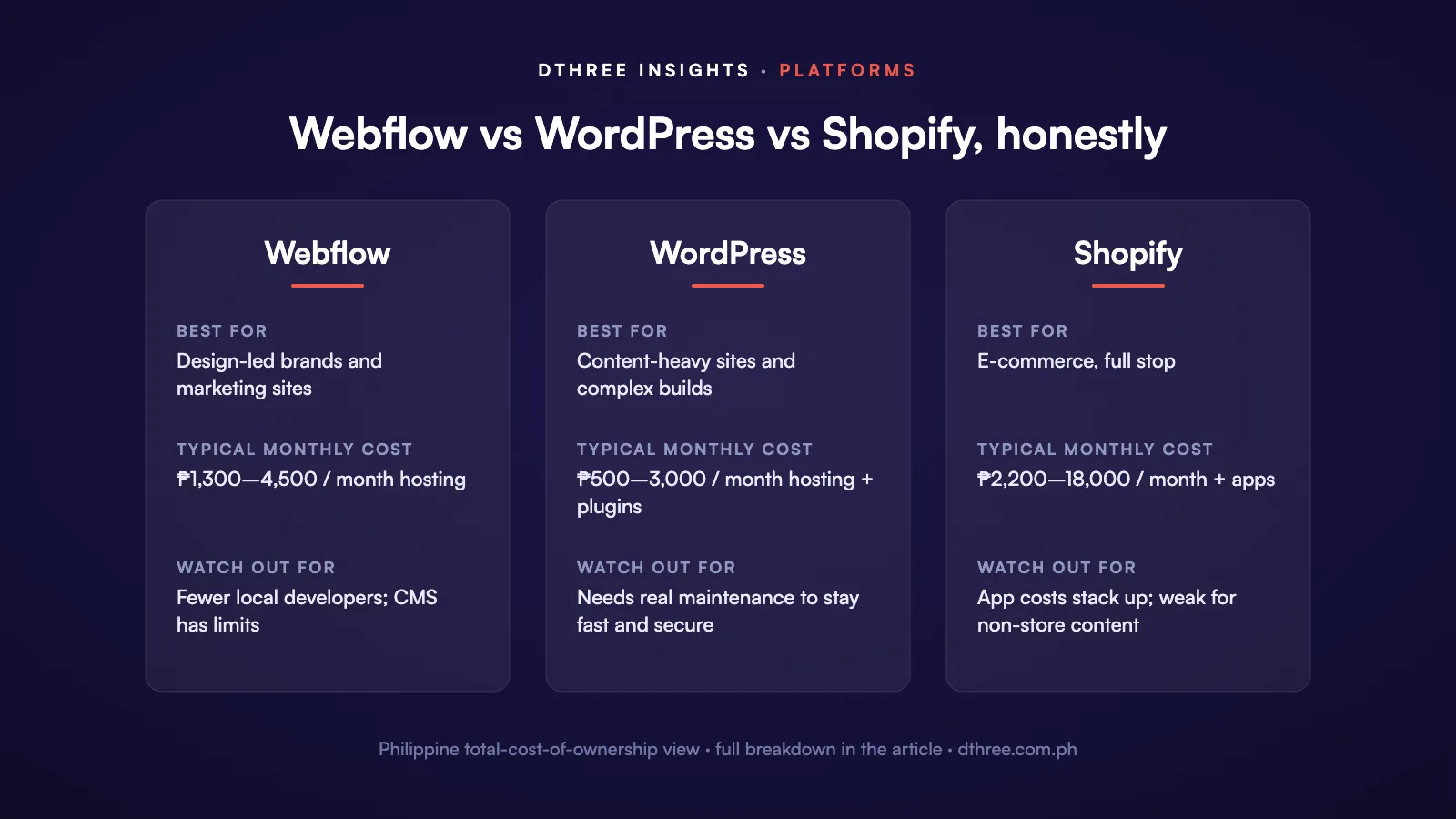
Total cost of ownership, Philippine context.
- Webflow: ₱1,300 to ₱4,500 a month for hosting, lower ongoing maintenance, higher upfront if you need a specialist.
- WordPress: ₱500 to ₱3,000 a month hosting, plus ₱5,000 to ₱15,000 a year in plugin licenses, plus maintenance. More affordable local developer rates.
- Shopify: ₱2,200 to ₱18,000 a month platform, plus ₱5,000 to ₱20,000 a month in apps for a full store, plus transaction fees if not on Shopify Payments.
Our recommendations
Choose Webflow if you are building a marketing site, corporate site, or portfolio; design and brand are top priorities; you want minimal maintenance; your content fits Webflow's CMS limits (most does); and you do not need complex e-commerce or membership features.
Choose WordPress if you are building a content-heavy site with thousands of pages; you need memberships, an LMS, directories, or multi-vendor marketplaces; you want maximum flexibility and no lock-in; you need deep integration with local gateways; and you have budgeted for ongoing maintenance.
Choose Shopify if selling products is your core business; you want proven checkout conversion; you need built-in inventory, shipping, and orders; you prefer a managed platform; and you will pay premium app costs for a complete stack.
Beyond the big three
These three cover most projects, not all. For content-heavy enterprises or teams that want the front end and back end decoupled, we also build on Drupal and headless CMS. If you are weighing one of those, talk to us before you commit.
The wrong question, one more time
We have watched businesses lose months and real budget on the wrong platform because they followed a trend or copied a competitor. A Shopify store for a company that sells three services and mostly needs a marketing site. A WordPress build for a five-page portfolio that now needs monthly maintenance. A Webflow site for a business that needed 50,000 product listings.
So start with your requirements, not the platform. Be honest about your team's technical capacity and your appetite for maintenance. Count total cost over three years, not the monthly fee. And look hard at who will run the site after launch. A platform your team cannot maintain will cost you more than any feature it offers can return.
Still unsure? Talk to us. You will get a straight answer based on what your project needs, not what we prefer to build.


.avif)