
How to Choose a Web Design Company in the Philippines: A Buyer's Checklist
Three quotes for the same website can range from ₱60,000 to ₱450,000. Here is how we would read them: what each includes, who actually does the work, whether your team can run the site after launch, and which price fits.

Hans Allí

How to Choose a Web Design Company in the Philippines: A Buyer's Checklist
Every few weeks, someone sends us three quotes for the same website and asks which one is right.
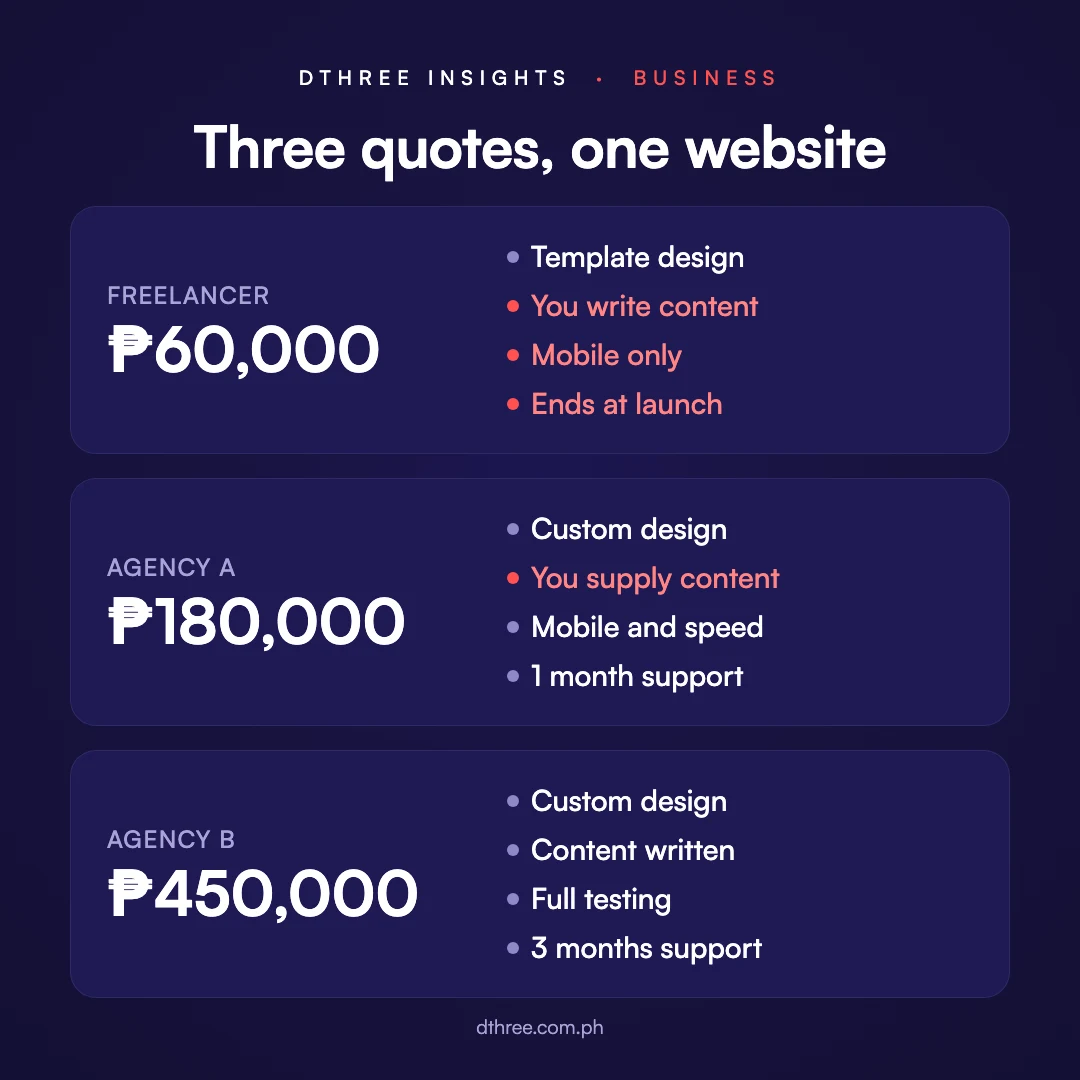
The numbers usually look something like this. One freelancer quotes ₱60,000. One agency quotes ₱180,000. Another agency quotes ₱450,000. Same company, same brief, same website, or so it seems. The person asking is usually a marketing head or an admin lead who has been handed the project on top of their actual job, and they want to make a sensible call without becoming a web expert first.
Our honest answer is often that all three could be right, because they are not quoting the same thing. This is how we would read them if we were sitting on your side of the table.
In short: compare what each quote includes, who will actually do the work, and whether your team can run and grow the site without the vendor. The price makes sense once those three are clear.
Why do quotes for the same website differ so much?
Because each vendor has quietly answered a different set of questions about your project, and the price reflects their answers.
How many pages, and who writes the words on them? Is the design made for you or adapted from a template? Who works on it, and how senior are they? Does anyone check the site on a phone, test its speed, or make it usable for people with disabilities? Can your team update it after launch, or does every change go back to the vendor?
The ₱60,000 quote might assume you supply every word and every photo, use a template, and stop at launch. The ₱450,000 quote might include content writing, custom design, a content management setup your team can use, and three months of support after launch. Both can be fair prices. The trouble is that most quotes do not spell their assumptions out. Our website cost guide covers the typical ranges and what each level includes.
What should you look at before the price?
The work, and specifically the live work.
A portfolio of screenshots tells you what a vendor can make look good in a mockup. A live site tells you whether it still works a year later. Open three or four of their sites on your phone. Tap the menu. Fill in a form. Wait and see how long the page takes to settle. This takes ten minutes and tells you more than any sales call.

While you are there, look for work that resembles your situation. A vendor who has built for schools, foundations or regulated companies will already know the questions your stakeholders are going to ask.
Who will actually work on your website?
This is the question most quotes leave out, and it explains a good part of the price.
A website needs strategy, design, writing, development and someone keeping the project on track. A freelancer covers all of that alone. For a small, well-defined site with a clear owner on your side, that can be ideal: it costs less, and you deal directly with the person doing the work. The trade-off is that one person is a single point of failure. If they get sick, get busy, or move on, your project waits.
A team costs more because more people touch the work, and the ones who matter most are the senior ones. When you compare quotes, ask a few specific things:
- Is it a full team? Design, content, development and project management, handled by people who do each of those well.
- Do senior people stay on it? Some agencies bring their best people to the pitch and hand the work to juniors after signing. Ask who will be in the working sessions, not just the first meeting.
- Is the work done in-house? Some vendors pass part of the job to subcontractors. That is not always bad, but you should know.
- Will the same people be there after launch? Continuity is what keeps small fixes small.
For what it is worth, our own teams are one project manager, two to three designers and two to three developers, with the directors involved from the first call to launch. We have written more about how a Dthree project runs.
.avif)
Will you be able to run and grow the site after launch?
This is where a cheaper build often becomes the more expensive website to own.

A well-built site is modular. Pages are assembled from sections your team can reuse and rearrange, so a new landing page is an afternoon in the editor rather than a request to a developer. The content management system, or CMS, matters just as much. News, projects, events and team members should live in structured collections, so adding a post means filling in a form, not touching the layout.
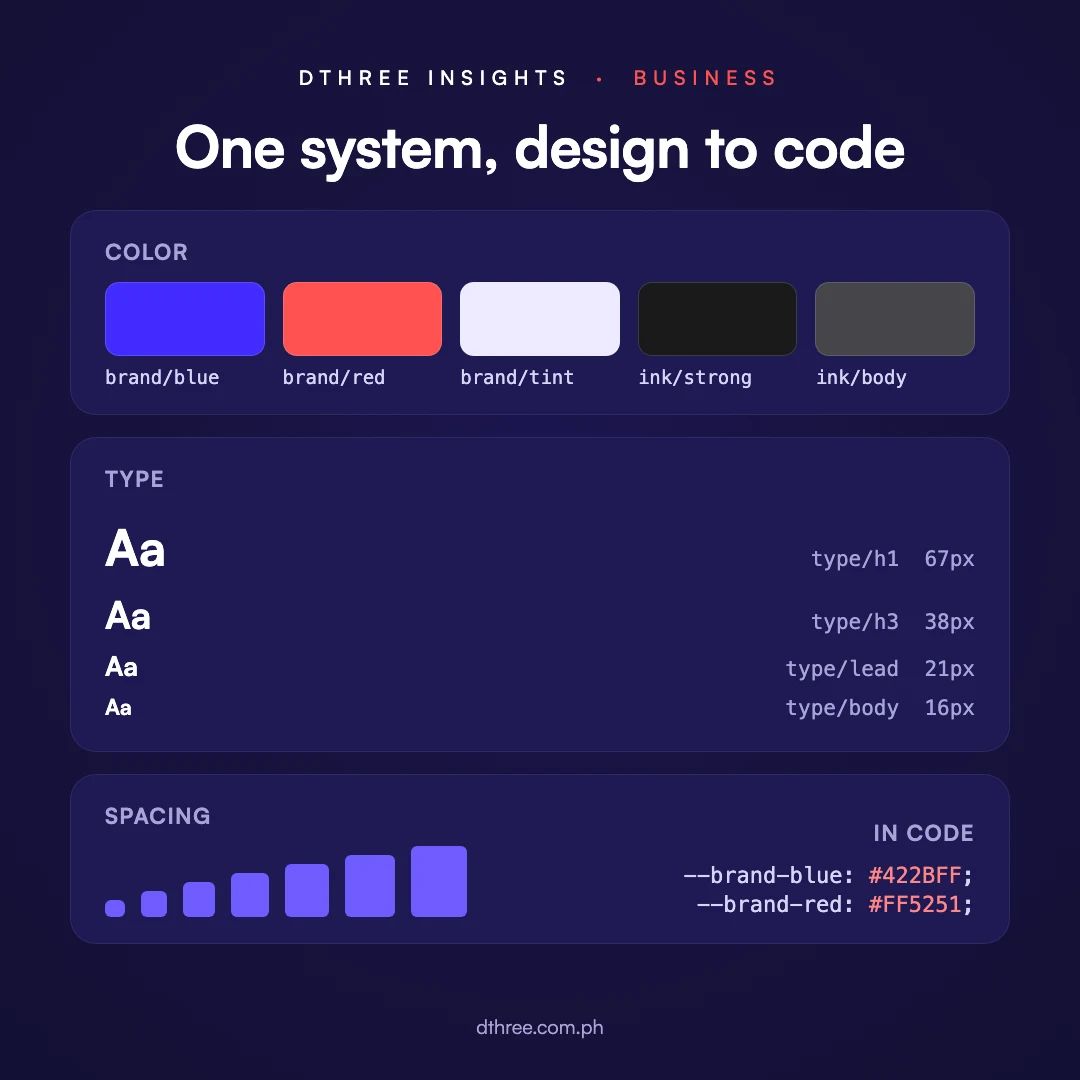
Behind a full website there should also be a system. Colors, type sizes and spacing are defined once as design tokens and shared by the design files and the code. That is what keeps a page added two years from now looking like the rest of the site, and what lets a new team member, or a different agency, pick up the work without guessing.
Finally, ask what the handover looks like. At the end of our projects, clients get CMS training for their team, a written guide, and the design system itself. Whatever a vendor offers, you should end up able to run the site day to day, and able to hand it to someone else later if you ever need to.
What are the red flags?
Any one of these can have an innocent explanation. Two or three together usually mean a project that will go sideways.
- A quote with no questions asked. If someone can price your website after a two-line email, they are pricing a template.
- Senior people only at the pitch. If nobody can tell you who will do the work, assume it is not the people in the room.
- Every change goes through them. No CMS your team can use, no training, no handover plan.
- The domain or hosting registered in their name. This is the most common way businesses lose control of their own website. Our ownership checklist covers what to check.
- No list of exclusions. Whatever is not written down will turn into an extra charge or an argument.
- "Unlimited revisions." It sounds generous. In practice it usually means the scope was never pinned down.
- No mention of mobile, speed or accessibility. These should be part of the build from the start. We have written about website speed and accessibility if you want to know what to ask for.
- No proper invoice. Since the Ease of Paying Taxes Act, a BIR-registered invoice is the document for services, replacing the old official receipt. A registered business can issue one.
What should you ask on the first call?
The most useful questions here are plain ones that show how a vendor thinks and works.
- Who will we be working with day to day, and which senior people stay on the project?
- What is not included in this quote?
- What will our team be able to change without you?
- What do we get at handover?
- Whose name will the domain and hosting be under?
- What usually delays your projects?
That last question is our favorite. A vendor who answers it honestly, and names things like late content or slow approvals, has done this enough times to know where projects get stuck.
How do you compare the quotes side by side?
Send every vendor the same written brief first. Our guide to what goes in a website brief has a one-page template you can copy. Then put the same questions to every quote.
- Pages and features included, and what is excluded
- Custom design or a template
- Who writes and supplies the content
- Who works on it, and how senior they are
- Mobile, speed and accessibility testing
- What your team can edit, and what you get at handover
- Timeline, and what it depends on
- Support after launch, its cost and its length
- Domain, hosting and files in your name

Where a quote says nothing, ask. The cheapest quote often becomes the most expensive once the missing items are added back. For how long each kind of project usually takes, see our website timeline guide.
Holding three quotes right now? Send them over and we will point out what each one leaves out, whether or not we end up being one of them.
Which price is the right fit for you?
The one that matches what the website has to carry.
A small business that needs a credible online presence does not need a ₱450,000 build. A company whose website has to bring in leads, satisfy several approvers, meet accessibility expectations, connect to other systems, and last five years probably cannot get that for ₱60,000. The right quote is the one sized to those demands, with nothing essential missing and nothing you will not use.
One more thing to watch: ongoing support. A build quote with light support after launch is normal. Heavy, ongoing support is a separate commitment, usually a monthly retainer, and it should be priced as one. Our guide to website maintenance costs covers what that looks like.
Questions we get asked
How many quotes should we get?
Three is usually enough. More than that and the comparison takes longer than the decision is worth.
Is the cheapest quote a red flag?
Not on its own. It is a question. Find out what it leaves out, and decide whether you can live without those things.
Is it normal to pay a downpayment?
Expect one. What is worth questioning is being asked to pay the full amount before any work is delivered, or being refused a look at the contract before you commit.
Does it matter if the company is local?
It helps. A local team knows how Philippine buyers search and pay, can meet in person when it matters, and works in your time zone.
Back to the three quotes
When we sit down with someone holding three quotes, the conversation rarely ends with "go with the cheapest" or "go with the most expensive". It usually ends with them seeing which one fits the project they actually have.
Our advice always starts from your situation: what the website has to do, who it has to serve, and what your team can sustain after launch. Sometimes that points to a larger build, sometimes a leaner one, and sometimes a different kind of partner. If you would like that kind of read on your project, send us your brief. We will tell you what we would recommend, and why.


.avif)